



# How To Use Cruise Control – Complete Guide
Cruise control is one of those modern car features that many drivers have but don’t fully use or understand. Used correctly, it can make driving more comfortable, help improve fuel efficiency, and even enhance safety on long trips. Used incorrectly, it can be risky.
In this complete guide, you’ll learn:
– ✅ What cruise control is and how it works
– ✅ The different types of cruise control (including adaptive cruise control)
– ✅ When you should and should not use cruise control
– ✅ Step‑by‑step instructions for using it safely
– ✅ Pro tips to get the most out of cruise control
—
## 🚗 What Is Cruise Control?
Cruise control is a system in your vehicle that automatically maintains a set speed without you needing to keep your foot on the accelerator. Once activated, the car will continue at the chosen speed until you adjust it, brake, or turn the system off.
### Key Benefits of Cruise Control
– ⚙️ **Comfort:** Reduces leg fatigue on long drives
– ⏱️ **Consistency:** Keeps a steady speed, ideal for highways
– ⛽ **Fuel Efficiency:** Smoother speed = better fuel consumption
– 🚦 **Speed Control:** Helps you avoid unintentionally speeding
—
## 🧠 How Cruise Control Works (In Simple Terms)
Modern cruise control systems use:
– A **speed sensor** to monitor your vehicle’s speed
– A **control module** (computer) to compare your current speed with the set speed
– An **actuator or throttle control** to adjust engine power and keep the speed steady
Once you set a speed (for example, 65 mph / 105 km/h), the system automatically controls the throttle to keep you at that speed, even on gentle hills.
—
## 🧩 Types of Cruise Control
Not all cruise control systems are the same. Knowing what your car has is the first step.
### 1. Standard (Conventional) Cruise Control
– Maintains a set speed
– Does **not** automatically slow down for traffic
– You must brake or turn it off if traffic slows
Best for:
✅ Light to moderate traffic
✅ Steady highway driving
—
### 2. Adaptive Cruise Control (ACC)
Adaptive cruise control is an advanced system that does more than just maintain speed. It also keeps a safe following distance from the car ahead.
It uses:
– Radar sensors
– Cameras or lidar (in some systems)
This allows it to:
– Automatically slow down when a car in front of you slows
– Speed back up to your set speed when the lane is clear
Some ACC systems can even bring your car to a complete stop and start again in traffic, depending on model and year.
Best for:
✅ Highway driving with variable traffic
✅ Long commutes
—
### 3. Intelligent / Predictive Cruise Control
Some vehicles have smart cruise systems that:
– Use **map data**, **GPS**, and **traffic sign recognition**
– Automatically adjust speed before curves, junctions, or speed limit changes
These systems are still evolving but are common in newer premium models.
—
## 🕹️ Cruise Control Buttons & Symbols (What They Mean)
While button placement varies by brand and model, most systems use similar icons and controls. Typically, you’ll find them on:
– The **steering wheel**
– A **stalk/lever** behind the steering wheel
### Common Buttons & Icons
– **ON / OFF** – Turns the cruise control system on or off
– **SET / SET–** – Sets the current speed or decreases the set speed
– **RES / +** – Resumes the last set speed or increases the set speed
– **CANCEL** – Temporarily disengages cruise without fully turning it off
For adaptive cruise control, you may also see:
– **Distance / Gap setting icon (car with bars in front)** – Adjusts how closely you follow the car ahead
Always check your owner’s manual for the exact layout in your car, but these labels are widely used.
—
## ✅ When You SHOULD Use Cruise Control
Using cruise control in the right conditions makes driving more efficient and relaxing.
### Ideal Conditions for Cruise Control
– 🛣️ **Highways and motorways**
– Long, straight roads with minimal stops
– ☀️ **Good weather**
– Dry roads, clear visibility, low wind
– 🚗 **Light and consistent traffic**
– Not constantly speeding up and slowing down
– 📏 **Stable speed zones**
– Areas where the speed limit doesn’t frequently change
### Practical Scenarios
– Long trips between cities
– Night highway driving when the road is clear
– Long, monotonous routes where speed is consistent
—
## ⚠️ When You Should NOT Use Cruise Control
Using cruise control in the wrong situation can be dangerous. Always prioritize control and awareness over comfort.
### Avoid Cruise Control In:
– 🌧️ **Rain, snow, or ice**
– Higher risk of hydroplaning or losing traction
– 🌫️ **Fog or poor visibility**
– You need maximum reaction time
– 🏔️ **Hilly, mountainous, or very winding roads**
– Speeds can change quickly; more braking is needed
– 🚦 **Heavy stop-and-go traffic**
– Frequent braking and acceleration make cruise control impractical
– 🏙️ **Urban streets or city driving**
– Too many stops, signs, and pedestrians
– 🛣️ **Road works, construction zones, or unfamiliar roads**
– Lower speed limits, obstacles, or sudden lane changes
If you’re unsure whether cruise control is safe in a given situation, the safest choice is not to use it.
—
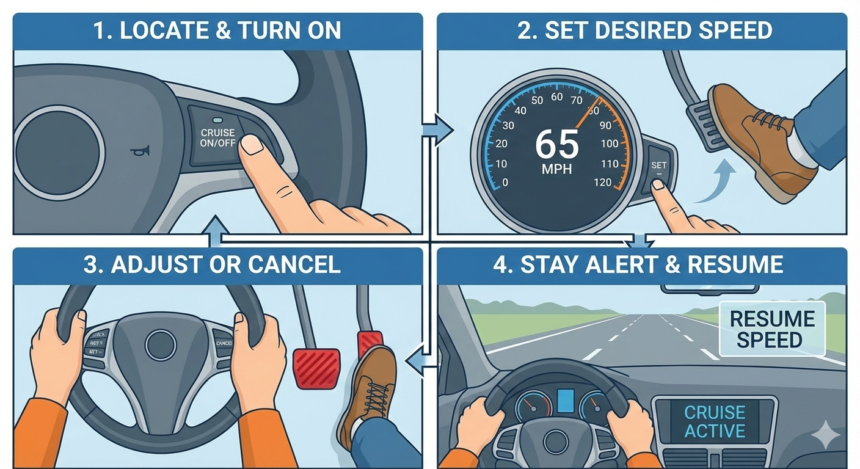
## 🧭 How To Use Standard Cruise Control (Step‑By‑Step)
Here’s a clear, practical walkthrough for conventional (non‑adaptive) cruise control.
### 1. Reach Your Desired Speed
– Accelerate manually to your desired speed (e.g., 60–70 mph / 95–115 km/h).
– Confirm that you’re in a safe zone to use cruise (good conditions, light traffic, suitable road).
### 2. Turn Cruise Control ON
– Press the **ON** button.
– You may see a **cruise control icon** light up on your dashboard, usually a speedometer symbol with an arrow or similar.
> Note: At this point, the system is on but not yet holding your speed.
### 3. Press “SET”
– Once at your desired speed, press **SET** (sometimes marked `SET–`).
– The system will now maintain your current speed without your foot on the accelerator.
### 4. Adjust Your Speed
Use the following controls:
– **RES / +** – Increase speed
– Some systems increase in small increments (e.g., +1 mph or +2 km/h)
– Holding the button may accelerate more quickly
– **SET / –** – Decrease speed
– Taps generally reduce in small increments
– Holding it may slow the car more noticeably
Tip: Watch your speedometer as you make adjustments so you stay within the legal limit.
### 5. Temporarily Cancel Cruise Control
You can temporarily disengage cruise control in several ways:
– Tap the **brake pedal**
– Press the **CANCEL** button (if available)
– In some cars, tapping the **clutch pedal** (manual transmissions)
The cruise icon will usually remain on but show that the speed is no longer being maintained.
### 6. Resume Your Set Speed
If you canceled cruise but didn’t turn it OFF:
– Press **RESUME (RES / +)**
– Your car will accelerate back to the last set speed (as long as conditions are safe)
### 7. Turn Cruise Control OFF Completely
– Press the **OFF** button when you no longer want to use cruise control
– Some cars will also turn cruise control off when you shut the engine down
—
## 🛰️ How To Use Adaptive Cruise Control (ACC)
Adaptive cruise control adds another layer: **following distance control**. While every brand has its own style, most systems follow a similar logic.
### 1. Activate the System
– Press the **ACC ON** button or combined cruise control button
– A symbol like a car with a speedometer and/or distance bars may appear on the dashboard
### 2. Set Your Speed
– Accelerate to your desired speed (e.g., 65 mph / 105 km/h)
– Press **SET**
– Your car will maintain that speed **unless** there’s a slower car in front of you
### 3. Set Following Distance
Use the **distance/gap button**, often marked with:
– A small car icon with several horizontal bars in front of it
Typical levels:
– Short gap
– Medium gap
– Long gap
For safety, especially at higher speeds, use **medium or long** following distance.
### 4. How ACC Reacts To Traffic
When there is:
– **No vehicle ahead:**
– Your car stays at the set speed
– **Slower vehicle ahead in your lane:**
– Your car automatically slows to match their speed
– **Vehicle moves out of your lane:**
– Your car smoothly returns to your set speed
Some advanced systems:
– Can bring the vehicle to a **complete stop** in traffic
– Can **restart** automatically when the vehicle ahead moves (within a certain time frame)
### 5. Overriding ACC
At any point, you can:
– Press the **accelerator pedal** to temporarily go faster
– Apply the **brakes** to disengage speed control
– Press **CANCEL** or **OFF** as needed
When you’re ready, you can **RESUME** the last set speed, just like standard cruise control.
—
## 🛡️ Safety Tips For Using Cruise Control
Even though cruise control is convenient, you are always responsible for driving safely.
### 1. Keep Your Foot Ready
– Rest your **right foot near the brake pedal**, not tucked far away
– This reduces reaction time in case you need to brake suddenly
### 2. Hands Stay On the Wheel
Cruise control is **not** autopilot.
– Keep both hands on the steering wheel
– Continuously scan the road ahead, mirrors, and blind spots
### 3. Watch for Speed Limit Changes
Cruise control will not automatically slow down for lower speed limits (unless you have advanced intelligent cruise). You must:
– Monitor speed limit signs
– Manually adjust your **SET** speed as needed
### 4. Be Extra Cautious on Descents
On steep downhill slopes:
– Your vehicle may exceed the set speed due to gravity
– Some systems will apply engine braking, but not all
– Use **lower gears** or light braking if the car gains too much speed
### 5. Don’t Rely on Cruise When Tired
Cruise control can reduce physical fatigue but may:
– Encourage **mental fatigue** or drowsiness on long, monotonous drives
Take regular breaks. If you feel sleepy, stop driving—no system replaces an alert human driver.
—
## ⚙️ Cruise Control on Manual vs Automatic Cars
### Automatic Transmission
– Easiest and most common setup
– The system smoothly manages gears and throttle
– Ideal for most drivers using cruise control regularly
### Manual Transmission
– Many manual cars also have cruise control
– If you press the **clutch pedal**, the system usually disengages
– You need to be more involved in:
– Choosing the right gear before setting cruise
– Resuming cruise after gear changes
Always make sure you’re in a gear that keeps the engine within a healthy RPM range at your chosen speed.
—
## ⛽ How Cruise Control Can Save Fuel
Used properly, cruise control can contribute to better fuel economy.
### Why It Helps
– Keeps a **steady speed** instead of repetitive acceleration and braking
– Reduces **unnecessary throttle input**
– Encourages more efficient driving, especially on flat highways
### Tips for Fuel‑Efficient Use
– Set a **moderate speed** (not the maximum legal limit)
– Avoid cruise control on **hilly terrain** where frequent gear changes and braking are needed
– Combine cruise with **eco driving habits**: gentle acceleration, proper tire pressure, and vehicle maintenance
—
## 🧪 Common Mistakes to Avoid
Avoid these frequent cruise control errors:
– ❌ Using cruise control in heavy rain or snow
– ❌ Setting the speed too high for conditions
– ❌ Ignoring changing speed limits
– ❌ Relying on ACC as a substitute for active driving
– ❌ Leaving cruise on when tired or drowsy
Being aware of these mistakes helps you stay safer and in full control.
—
## 📝 Quick Cruise Control Checklist
Before you activate cruise control, ask yourself:
– Am I on a **highway or open road** with few stops?
– Are the **weather and road conditions** good?
– Is **traffic light to moderate**, not stop‑and‑go?
– Am I **alert and fully awake**?
– Do I know how to quickly **cancel or brake** if needed?
If you can answer “yes” to all of these, it’s probably a good time to use cruise control.
—
## 🧩 Troubleshooting: Why Cruise Control Might Not Work
If your cruise control isn’t working, common causes include:
– 🚨 **Warning lights on the dash** (check engine, ABS, etc.)
– 💡 **Brake light switch issues** – the system thinks you’re braking
– 🔌 **Blown fuse** related to the cruise system
– 🧷 **Clutch switch issues** (manual cars)
– ⚙️ **Faulty sensors** (especially in ACC systems)
If basic checks (like ensuring you’re above the minimum speed required, often around 25–30 mph / 40–50 km/h) don’t help, have the system inspected by a professional.
—
## 🏁 Final Thoughts: Using Cruise Control the Right Way
Cruise control is a powerful tool when understood and used responsibly. It can:
– Make long drives more comfortable
– Help you control your speed more consistently
– Contribute to better fuel economy
However, it’s not a replacement for an attentive driver. Always:
– Use cruise control only in safe conditions
– Keep your focus on the road
– Know exactly how to **set, adjust, cancel, and resume** your system
By following the steps and tips in this guide, you’ll be able to use cruise control confidently, safely, and effectively every time you drive.







